> ## Documentation Index
> Fetch the complete documentation index at: https://cometchat-22654f5b-docs-agentbuddy-4.mintlify.site/llms.txt
> Use this file to discover all available pages before exploring further.

# Apple Privacy Manifest

> Configure the required Apple Privacy Manifest for CometChat React Native UI Kit to comply with App Store requirements.

<Accordion title="AI Integration Quick Reference">
  | Field         | Value                                                                                                                                                                                                              |
  | ------------- | ------------------------------------------------------------------------------------------------------------------------------------------------------------------------------------------------------------------ |
  | Package       | `@cometchat/chat-uikit-react-native`                                                                                                                                                                               |
  | File location | `ios/YourApp/PrivacyInfo.xcprivacy`                                                                                                                                                                                |
  | Required APIs | `NSPrivacyAccessedAPICategoryFileTimestamp` (C617.1), `NSPrivacyAccessedAPICategoryUserDefaults` (CA92.1), `NSPrivacyAccessedAPICategorySystemBootTime` (35F9.1), `NSPrivacyAccessedAPICategoryDiskSpace` (E174.1) |
  | Purpose       | Configure required Apple Privacy Manifest for App Store compliance                                                                                                                                                 |
  | Related       | [Getting Started](/ui-kit/react-native/react-native-cli-integration) · [Expo Integration](/ui-kit/react-native/expo-integration) · [All Guides](/ui-kit/react-native/guide-overview)                               |
</Accordion>

## Overview

The Apple Privacy Manifest enhances privacy and transparency for apps on Apple's platforms. As part of Apple's commitment to user privacy and data security, they introduced the "App Privacy Details" section — a privacy label for each app.

The privacy manifest is a property list that records:

* The types of data collected by an app or third-party SDK
* The required reasons APIs an app or third-party SDK uses

For each type of data an app or third-party SDK collects and category of required reasons API it uses, the app or SDK needs to record the reasons in its bundled privacy manifest file.

***

## React Native UI Kit Privacy Requirements

If you are using the React Native UI Kit, you need to add the following entries to your Privacy Manifest file.

### Dependencies Requiring Privacy Declarations

1. **React Native Framework**

   React Native uses several APIs that require privacy declarations. See the React Native community [discussion](https://github.com/react-native-community/discussions-and-proposals/discussions/776) for more details.

2. **SPTPersistentCache**

   The React Native UI Kit uses a native module (a fork of react-native-video) that has an internal dependency on SPTPersistentCache. This library uses one of the APIs listed by Apple.

***

## Privacy Manifest File

Below is the complete Privacy Manifest that should be included in your application:

<Tabs>
  <Tab title="PrivacyInfo.xcprivacy">
    ```xml theme={null}
    <?xml version="1.0" encoding="UTF-8"?>
    <!DOCTYPE plist PUBLIC "-//Apple//DTD PLIST 1.0//EN" "http://www.apple.com/DTDs/PropertyList-1.0.dtd">
    <plist version="1.0">
    <dict>
        <key>NSPrivacyAccessedAPITypes</key>
        <array>
            <dict>
                <key>NSPrivacyAccessedAPIType</key>
                <string>NSPrivacyAccessedAPICategoryFileTimestamp</string>
                <key>NSPrivacyAccessedAPITypeReasons</key>
                <array>
                    <string>C617.1</string>
                </array>
            </dict>
            <dict>
                <key>NSPrivacyAccessedAPIType</key>
                <string>NSPrivacyAccessedAPICategoryUserDefaults</string>
                <key>NSPrivacyAccessedAPITypeReasons</key>
                <array>
                    <string>CA92.1</string>
                </array>
            </dict>
            <dict>
                <key>NSPrivacyAccessedAPIType</key>
                <string>NSPrivacyAccessedAPICategorySystemBootTime</string>
                <key>NSPrivacyAccessedAPITypeReasons</key>
                <array>
                    <string>35F9.1</string>
                </array>
            </dict>
            <dict>
                <key>NSPrivacyAccessedAPIType</key>
                <string>NSPrivacyAccessedAPICategoryDiskSpace</string>
                <key>NSPrivacyAccessedAPITypeReasons</key>
                <array>
                    <string>E174.1</string>
                </array>
            </dict>
        </array>
        <key>NSPrivacyCollectedDataTypes</key>
        <array/>
        <key>NSPrivacyTracking</key>
        <false/>
    </dict>
    </plist>
    ```
  </Tab>
</Tabs>

***

## Creating the Privacy Manifest

<Steps>
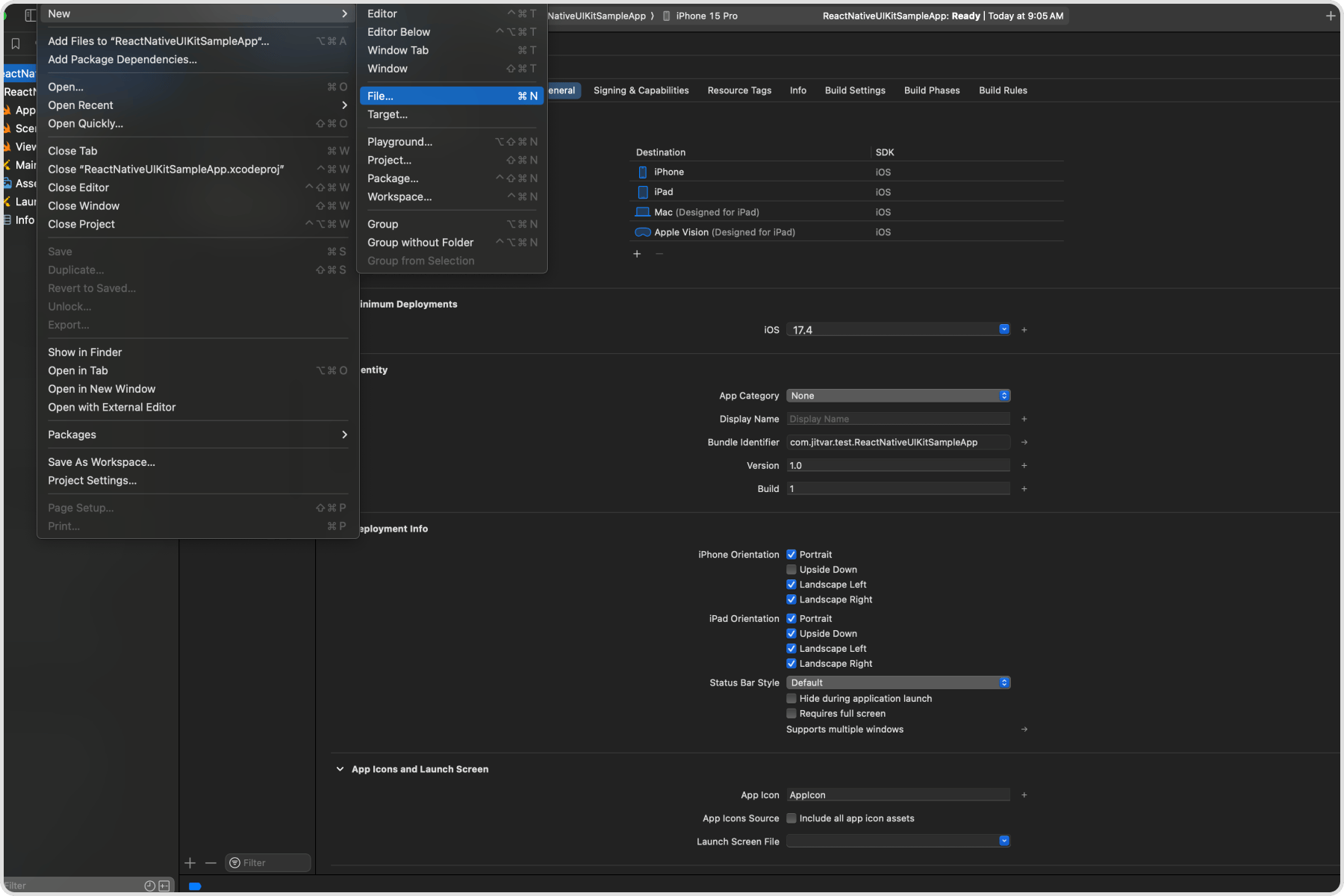
  <Step title="Create a new file in Xcode">
    Open Xcode and choose **File > New > File...**
    <Frame>
      <img src="https://mintcdn.com/cometchat-22654f5b-docs-agentbuddy-4/mkhtq4BL0JpfiQTV/images/edbeb017-apple-privacy-manifest-creation-step-1-final-cd4857dcb14e91234b4301316ab60c1b.png?fit=max&auto=format&n=mkhtq4BL0JpfiQTV&q=85&s=a55d92f45d6e123c36504b3023de6f05" alt="Xcode File Menu" width="1800" height="1200" data-path="images/edbeb017-apple-privacy-manifest-creation-step-1-final-cd4857dcb14e91234b4301316ab60c1b.png" />
    </Frame>
  </Step>

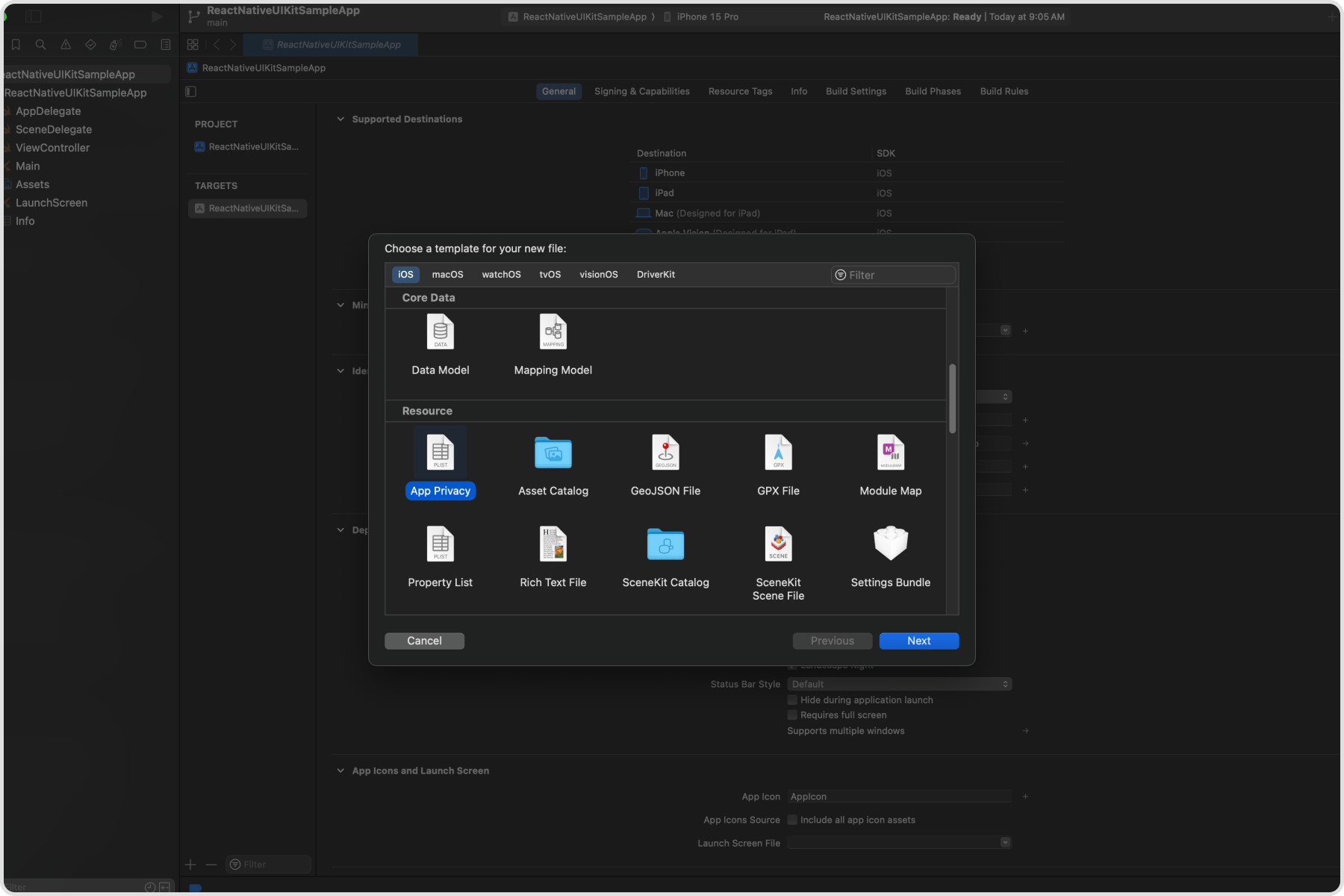
  <Step title="Select App Privacy file type">
    Scroll down to the **Resource** section, select the **App Privacy** file type, and click **Next**.
    <Frame>
      <img src="https://mintcdn.com/cometchat-22654f5b-docs-agentbuddy-4/rPN_XfmakdIQNCSH/images/ce4cc7d2-apple-privacy-manifest-creation-step-2-final-ad9e619b088e69e38354074beadf2958.png?fit=max&auto=format&n=rPN_XfmakdIQNCSH&q=85&s=02c12ec0c08e03481d34a38c31a78213" alt="Select App Privacy File Type" width="1800" height="1200" data-path="images/ce4cc7d2-apple-privacy-manifest-creation-step-2-final-ad9e619b088e69e38354074beadf2958.png" />
    </Frame>
  </Step>

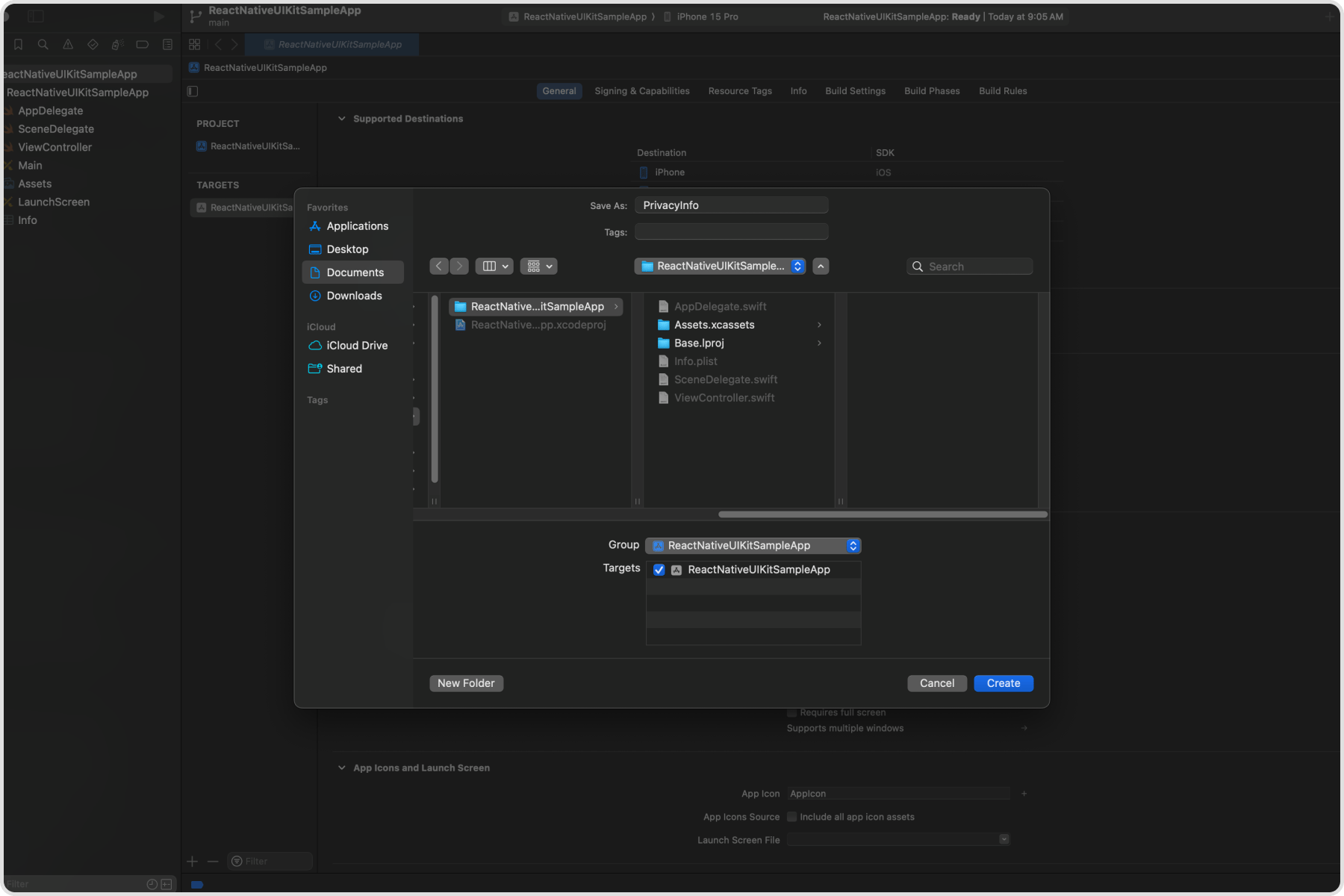
  <Step title="Select the target">
    Select your app target, then click **Create**.
    <Frame>
      <img src="https://mintcdn.com/cometchat-22654f5b-docs-agentbuddy-4/sZSQ4z4mSAiyZ8bM/images/28e6426a-apple-privacy-manifest-creation-step-3-final-37aec52c41b310a71bfb28cfb7a4846b.png?fit=max&auto=format&n=sZSQ4z4mSAiyZ8bM&q=85&s=ebaa9069aaf717d678d157dedb3dbe50" alt="Select Target" width="1800" height="1200" data-path="images/28e6426a-apple-privacy-manifest-creation-step-3-final-37aec52c41b310a71bfb28cfb7a4846b.png" />
    </Frame>
  </Step>

  <Step title="Keep the default filename">
    By default, the file is named `PrivacyInfo.xcprivacy`. Do not change this filename.
  </Step>

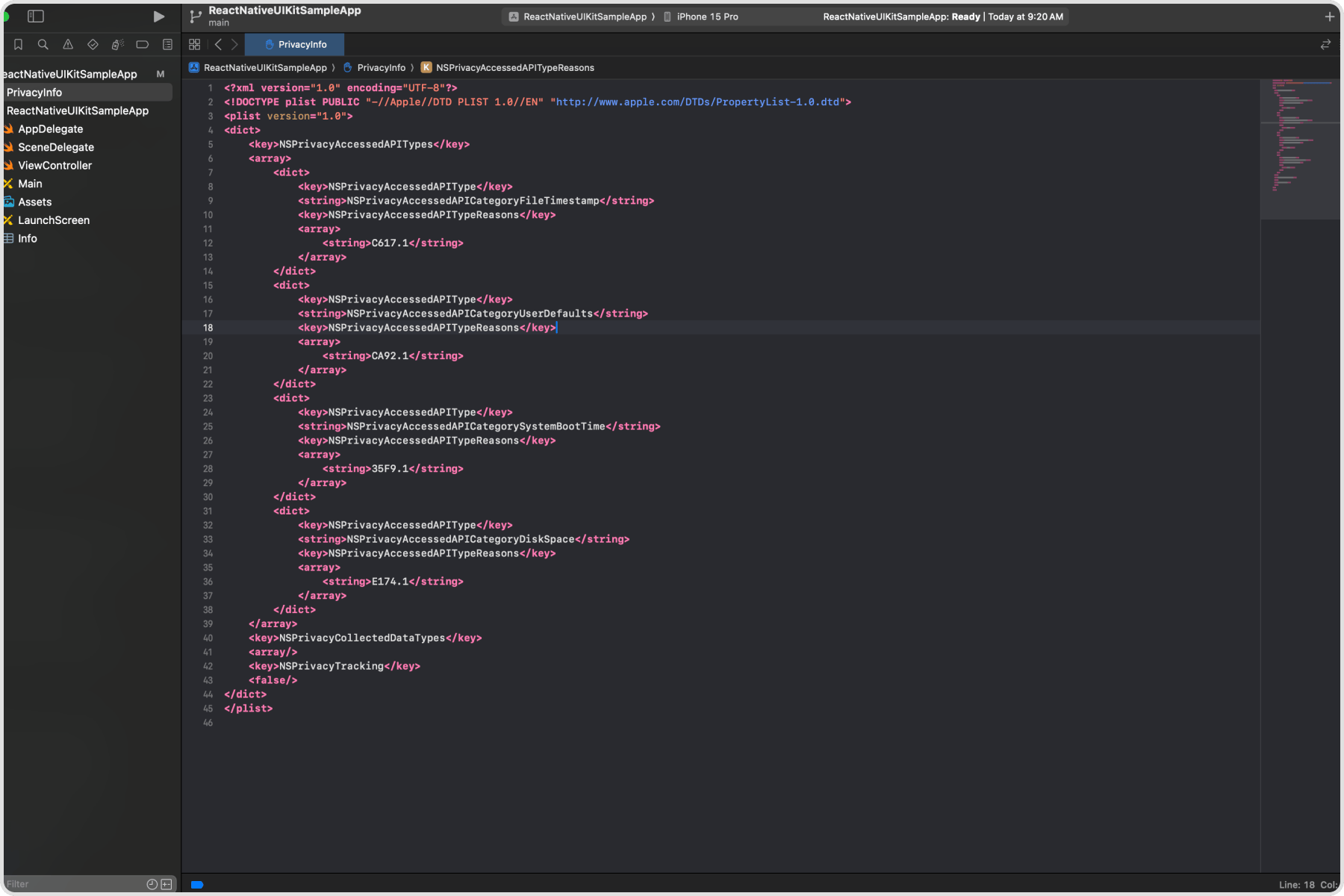
  <Step title="Replace the file content">
    This creates an empty Privacy Manifest file. Replace the content with the manifest XML provided above.
    <Frame>
      <img src="https://mintcdn.com/cometchat-22654f5b-docs-agentbuddy-4/-iCkFmJLnMHHC-MW/images/80bdf608-apple-privacy-manifest-creation-step-5-final-7567e6092b96a6c3ad7d44c2a30bcb12.png?fit=max&auto=format&n=-iCkFmJLnMHHC-MW&q=85&s=35b9e105fcf17e279678b4f0745cb369" alt="Privacy Manifest Content" width="1800" height="1200" data-path="images/80bdf608-apple-privacy-manifest-creation-step-5-final-7567e6092b96a6c3ad7d44c2a30bcb12.png" />
    </Frame>
  </Step>
</Steps>

***

## Next Steps

<CardGroup cols={2}>
  <Card title="Getting Started" icon="rocket" href="/ui-kit/react-native/react-native-cli-integration">
    Complete UI Kit setup guide
  </Card>

  <Card title="Expo Integration" icon="mobile" href="/ui-kit/react-native/expo-integration">
    Configure for Expo development builds
  </Card>

  <Card title="All Guides" icon="book" href="/ui-kit/react-native/guide-overview">
    Browse all feature and formatter guides
  </Card>

  <Card title="Components Overview" icon="grid" href="/ui-kit/react-native/components-overview">
    Explore all available components
  </Card>
</CardGroup>
